Stop losing deals in your inbox
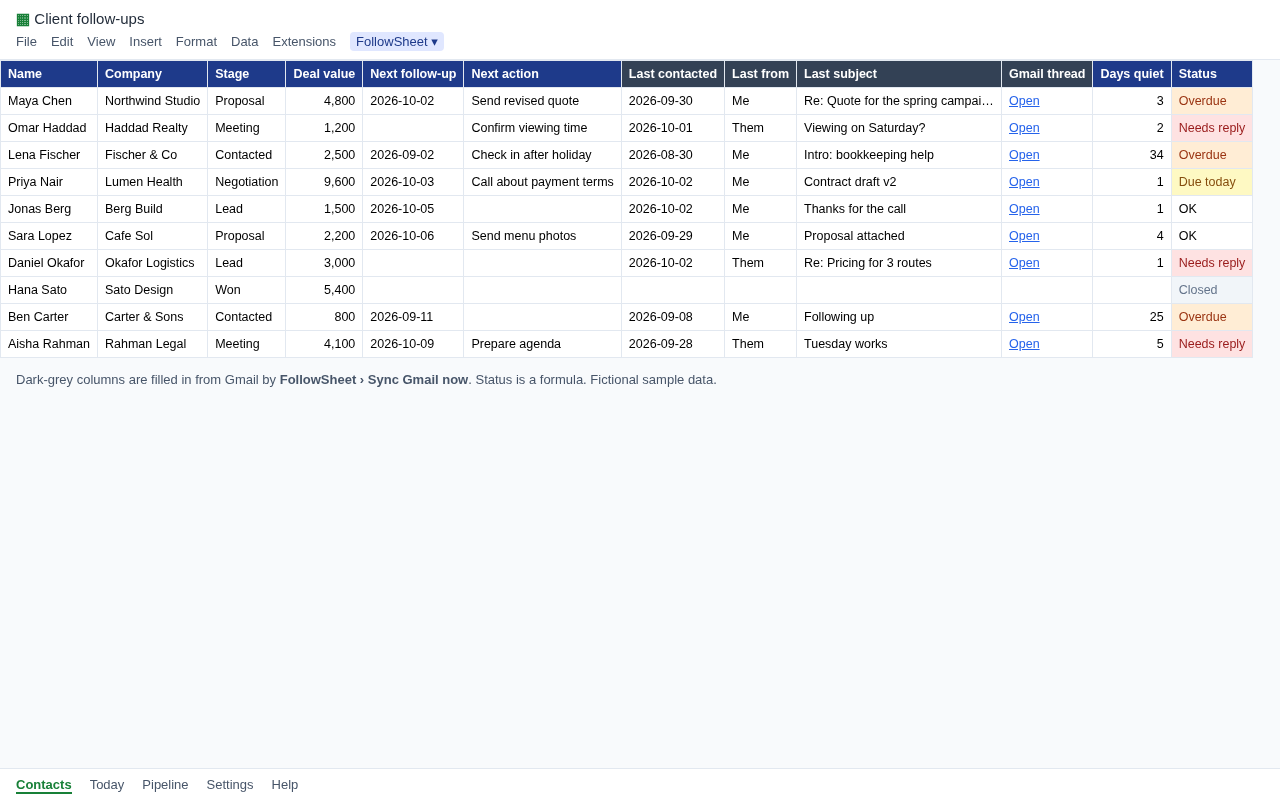
You already keep clients in a spreadsheet. FollowSheet makes that sheet fill itself in: it checks Gmail for every contact and writes when you last emailed, who wrote last and the thread link. Then it tells you, every morning, who to chase.
Needs replyOverdueDue todayGone coldClosed
No new app to learn, no data copied to anyone's server, no per-seat bill. It is a Google Sheet plus a small script that runs in your own Google account.
Make a copy (free)
Google opens the template and asks you to Make a copy; the copy is yours, in your own Drive. The first time you open FollowSheet › Open panel, Google shows "Google hasn't verified this app". That is expected: the script is your private copy, not a published app. Click Advanced › Go to FollowSheet (unsafe), review the permissions and click Allow.
Or install from files: template (.xlsx) · script (.zip) · setup steps. Ready for more? Pro and Team are on sale now.
Why people want this
- Streak's free plan has no CRM pipelines. On streak.com/pricing (checked Oct 2026) pipelines start on paid plans at $49 per user per month billed yearly ($59 monthly). That is a lot for a freelancer or solo business that just needs to know who to chase.
- "Last contacted" typed by hand is always wrong. A common piece of advice in small-business CRM threads: skip any tool where you have to update it yourself. FollowSheet reads it from Gmail.
- Big CRMs are overkill for a freelancer, agent, recruiter or consultant with 30 to 1,000 contacts. A sheet you can sort, filter and share is enough, if it stays up to date.
What it does
- Gmail sync: for each row with an email, finds your latest real email either way (drafts ignored, aliases recognised), then fills in Last contacted, Last from (Them/Me), Last subject and a link to the thread.
- Status column: a plain formula that works in Google Sheets and Excel. It shows Needs reply when they wrote last, Overdue or Due today from your follow-up date, Gone cold after 21 quiet days (you can change this) and Closed for Won/Lost.
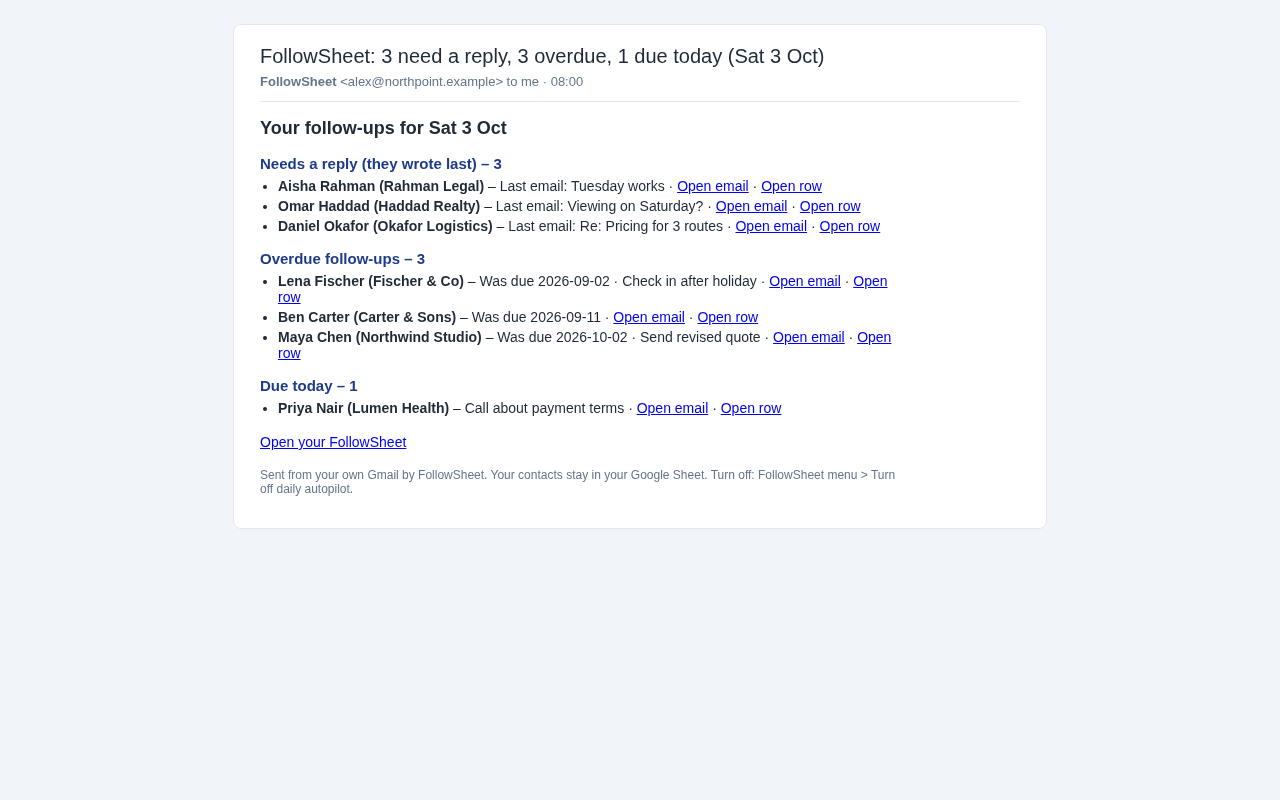
- Today tab: a short list of who needs you, with links back to the row.
- Daily email (Pro): every morning at your chosen hour FollowSheet syncs Gmail and emails you the list, sent from your own Gmail.
- Auto follow-up date (Pro): when you send an email and leave Next follow-up empty, it sets one 3 days later (you can change the gap).
- Capture from a Gmail label (Pro): put the label FollowSheet on an email from a new lead and the sender becomes a new row.
- Pipeline tab: deals and value per stage. You can rename or add stages.
- Team: one licence for 5 Google accounts. Put an owner's email on a row and each owner gets their own daily list.
Pricing
Free
- All tabs, statuses and the Pipeline
- Manual Gmail sync of 25 contacts at a time
- Today list and a digest email when you ask for one
Pro
or $59/year (2 months free)
- Unlimited contacts per sync
- Daily autopilot: sync, then a morning email
- Auto follow-up dates and Gmail-label capture
- Use it in up to 3 Google accounts
Every new sheet gets a 14-day Pro trial with no card. When the trial ends nothing breaks: your data stays put and you drop back to the free plan. Checkout is handled by Dodo Payments as merchant of record. After you pay, your licence key arrives by email: paste it into FollowSheet › Open panel › Licence key (the same panel also has these Buy links). Subscriptions can be cancelled anytime and stay active until the end of the paid period. All sales final: by purchasing you agree that delivery starts immediately and you lose any right to withdraw or get a refund (refund policy, terms).
FollowSheet vs Streak
| FollowSheet | Streak (streak.com/pricing, Oct 2026) | |
|---|---|---|
| Where your data lives | Your own Google Sheet | Streak's servers, shown inside Gmail |
| Pipelines on the free plan | Yes | No |
| Price for automation | $7/month or $59/year | From $49 per user per month (yearly) |
| Email tracking, mail merge, Gmail sidebar | No (by design: no tracking pixels) | Yes |
| Works in Excel too | The template and statuses do; the Gmail sync needs Google Sheets | No |
If you need open tracking, sequences or a Gmail sidebar, Streak or a full CRM is the better fit. FollowSheet does one job: making sure nobody waits on you. Full comparison: FollowSheet as a free Streak alternative.
Setup (about 3 minutes)
Option A: one-click copy (recommended)
- Open the FollowSheet template and click Make a copy.
- In your copy, wait about 5 seconds for the FollowSheet menu next to Help, then choose FollowSheet › Open panel.
- Google asks you to authorise the script: click Continue and choose your account. On "Google hasn't verified this app" click Advanced › Go to FollowSheet (unsafe), review the permissions and click Allow. (It appears because the script is your own private copy, not a published app.)
- Add contacts with their email, then click FollowSheet › Sync Gmail now. To get the morning email, turn on Daily autopilot.
Option B: install from files
- Download the template, upload it to Google Drive and open it with Google Sheets. You can also start from a blank Google Sheet.
- In the sheet, open Extensions › Apps Script. Paste
FollowSheet.gsfrom the zip over the code there, add an HTML file namedSidebarwithSidebar.html, then save. - Reload the sheet. Choose FollowSheet › Set up / repair this sheet and authorise as in step 3 of option A.
- Add contacts and sync, as in step 4 of option A.
The full guide is INSTALL.md in the zip. It covers every permission and how to remove FollowSheet.
Privacy
FollowSheet has no server. The script runs in your Google account, reads Gmail only to find the latest message for the addresses in your sheet, and writes the results into your sheet. Your contacts and emails are never sent to Karuna Labs or anyone else. There are only two network calls: checking a licence key with Dodo Payments' licence API (it sends the key and nothing else), and the daily list, which goes from your Gmail to you. The script is plain text, so you can read every line before you run it.
Google permissions it asks for: this spreadsheet only; Gmail (to read message headers, manage the capture label and send your daily list); triggers (for the daily run); external requests (licence check only); your email address (to send the list to you). Google describes the Gmail permission broadly ("read, compose, send and permanently delete"), because that is the permission Apps Script's built-in Gmail service requires. The script only does what is listed here.
FAQ
Does it read the body of my emails?
No. It looks at the date, sender, recipients and subject of messages to and from your contacts, and nothing else.
Can it send emails to my clients?
No. The only email it sends is your own daily list, to you (and to row owners on Team).
How many contacts can it handle?
Thousands. Google limits how long scripts can run, so on Pro, large sheets sync in batches in the background a minute apart.
Does it work with Google Workspace accounts?
Yes, if your admin allows Apps Script. It also works with a free @gmail.com account.
What happens if I stop paying?
The daily autopilot pauses and you get one email to say so. Your sheet, data and manual sync of 25 contacts keep working.
Is there a Chrome extension?
No, and you don't need one. Everything runs inside Google Sheets.
Questions? Contact us.